KBN-P
4U Rack Extension · Note Player
KBN-P is the Player edition of the Kinetic note engine. Drop it into the Player slot above any instrument and four bouncing balls play it for you — pitched notes in your scale, up to four voices at once, with nothing to patch. Anything you play from your keyboard passes straight through, so you can perform right over the generative part.
- A Player: bouncing balls play your instrument
- Up to four voices, always in your scale
- Ratchet trip lines fire scale-run arpeggios
// The device
Front & back
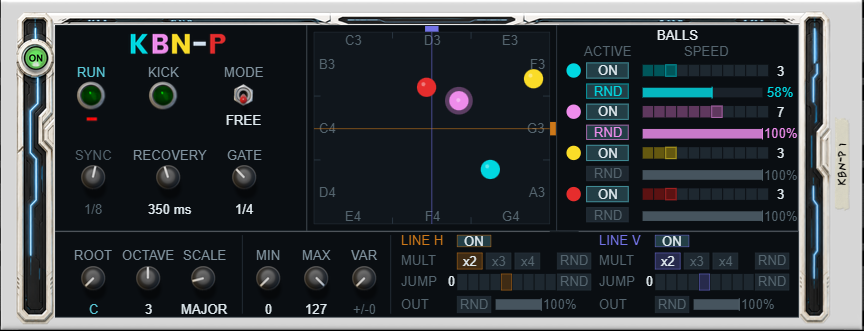
Front panel — the Player ON button top-left, Controls, the Arena with a note label in every zone, the per-ball editor, and the Pitch / Velocity / Ratchet-Lines strip below.
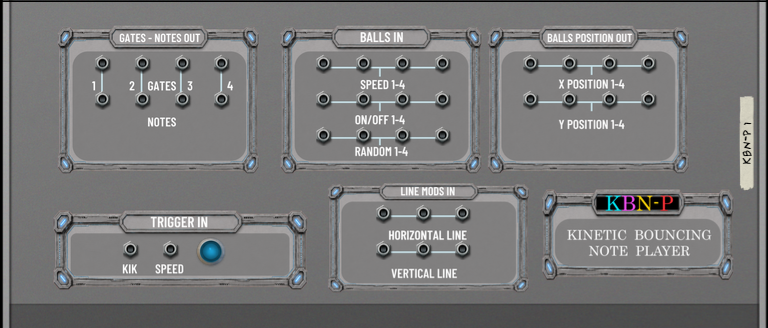
Back panel — the auxiliary gate+note voice pairs and ball-position outputs across the top, Trigger In and Line Mods inputs below. The notes themselves go to the instrument beneath KBN-P in the Player chain.
// Overview
Bouncing balls that play your instrument
As a Reason Player, KBN-P sits in the Player slot at the top of an instrument's track and feeds it notes — no cables required. Each of the four balls holds one note at a time, so it can play up to four voices into the instrument at once (give the instrument enough polyphony to sound them). Any notes arriving from your keyboard or a Player above are passed straight through, so KBN-P never blocks your own playing.
Under the hood it's the KBN note engine: each wall split into three zones climbing your scale, ten scales, selectable root and octave, collisions ringing the root, and the two ratchet trip lines for motion-triggered arpeggios. Velocity follows impact speed, with a Min/Max window and per-hit variation.
The Player ON button and Reason's Bypass All both freeze the arena in place and go silent while your pass-through playing continues — switch back on and the balls resume exactly where they left off. For deeper rigs, the back panel still exposes four gate+note voice pairs and eight ball-position CVs to drive other devices in parallel.
// Detail
What's inside
The Player
- Drops into any instrument's Player slot — no cables to hear it
- Plays the device below with up to four simultaneous voices
- Passes your own playing through, so you can perform along
- ON button and host Bypass freeze the arena and resume in place
The engine
- Four balls, elastic collisions, adjustable recovery; Kick reshuffles
- Each wall split into 3 zones = 12 ascending scale steps
Pitched output
- Selectable Root, Octave and Scale (10 scales)
- Arena labels every zone with the note it plays
- Collisions ring the Root as a natural anchor
Ratchet trip lines (H + V)
- A crossing fires a ratchet burst of notes
- x2 / x3 / x4 count, jump −4…+4, randomise count / jump / output
- Spread across one grid step, locked to tempo
Velocity & timing
- Velocity from impact speed; Min / Max window + per-hit variation
- Free or Quant timing; musical gate 1/8–1/1
- Per-ball probability thins wall notes; collisions always play
Back-panel CV
- Four gate + note voice pairs mirroring the played voices
- Eight ball-position CVs (X/Y) for smooth modulation
- Inputs: global + per-ball speed, per-ball on/off & random, per-line position / on-off / random, Kick
Format & footprint
- 4U Rack Extension — Note Player
- Plays instruments; makes no audio of its own
- State saved with your song; Reason 14 and later
// Documents & specs
Manuals
The complete guide plus a short quick-start — every control, the arena, the CV connections and a set of patch ideas. PDF.
- User manual KBN-P_User_Manual.pdf Cover plus 18 sections — using it as a Player, the engine, pitch, ratchet lines, timing, back-panel CV and specs
- Quick start KBN-P_Quick_Start.pdf Two pages — five minutes to your first part